


K-1000C Using Manual
K-1000C Using Manual
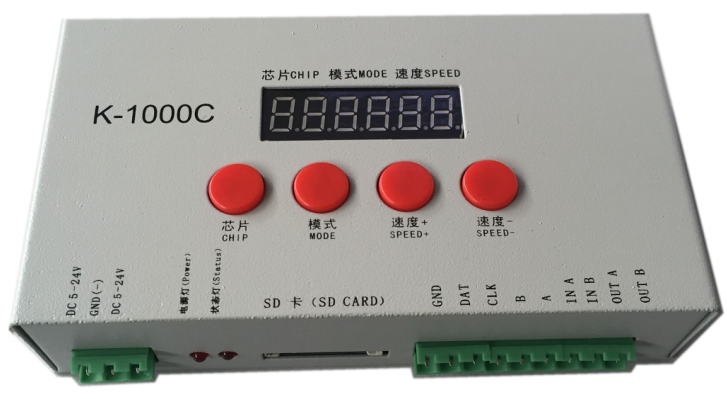
一、K-1000C system features:
Notes:
二、Support chips(PC Software Select K-1000-RGB):
NOTES:
三、Appearance Picture:
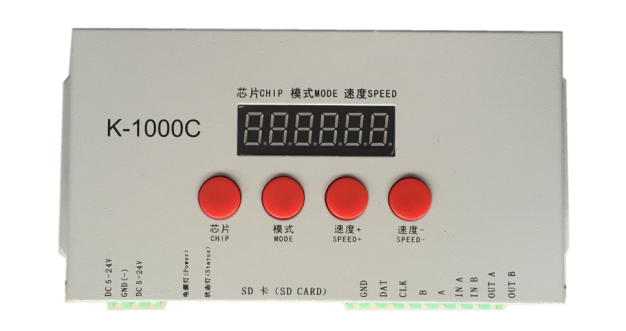
四、Screen print meaning:
Button meaning:
|
Button |
Meaning |
|
|
CHIP |
Switch chip |
Press CHIP and then MODE button, can enter write code mode, 61 means UCS512-A/B coding; 62 means WS2821 coding; 63 means SM512 coding, 64 means UCS512-C coding |
|
MODE |
Switch file |
|
|
SPEED+ |
Speed up |
Press SPEED+ and SPEED- the same time, would enter effect files looping mode. |
|
SPEED- |
Speed down |
|
Interface Meaning:
|
DC 5-24V |
5v-24V DC power positive input |
|
GND |
DC power supply negative input |
|
POWER |
Power indicator |
|
状态灯ERROR |
状态指示灯 |
|
SD card(SD CARD) |
SD card slot |
|
GND |
Ground line |
|
CLK |
Clock line(Coding line if DMX lights) |
|
DAT |
Data line |
|
B |
Signal - |
|
A |
Signal + |
|
IN A |
Cascade sync signal, connect the front OUT A |
|
IN B |
Cascade sync signal, connect the front OUT B |
|
OUT A |
Cascade sync signal, connect the next IN A |
|
OUT B |
Cascade sync signal, connect the next IN B |
The corresponding frame rate of speed level:
|
Speed Level |
Frame Rate/Sec |
Speed Level |
Frame Rate/Sec |
|
1 |
4 frame |
9 |
14 frame |
|
2 |
5 frame |
10 |
16 frame |
|
3 |
6 frame |
11 |
18 frame |
|
4 |
7 frame |
12 |
20 frame |
|
5 |
8 frame |
13 |
23 frame |
|
6 |
9 frame |
14 |
25 frame |
|
7 |
10 frame |
15 |
27 frame |
|
8 |
12 frame |
16 |
30 frame |
五、Conventional IC lamps wiring

NOTE:
六、Controller support DMX lights coding and wiring method:
Two signal wiring diagram:

Single signal wiring diagram:


六、Specific parameter:
Memory card:
- Type: SD card
- Capacity: 128MB—32GB
- Format: FAT or FAT32
- Storage file: *.led
Physical parameter:
- Working temperature :-30℃—85℃
- Working power:DC 5V -24V input
- Power consumption:2W
- Data transmission interface:3pin binding post
- Weight: 0.35Kg
- Size:

七、NOTES:
- 1、To copy files to SD card, you must format the SD card first, pay attention to is that each copy must be formatted first.
- 2、SD card must be formatted as FAT form or FAT32 form.
- 3、The SD card can not be hot-swappable, plug the SD card each time, you must first disconnect the power supply controller.
八、How to handle the common problems:
Problem 1:
Answer: The screen display FFF means the controller did not read the SD card correctly, the exist problems as below:
① SD card is empty, has no effect files.
② The effect files *.led in SD card and the controller model is mismatch, please select correct controller model, chip model in the latest edition 2016LedEdit, and remake effect files *.led.
③ Change SD card and then retesting, rule out the possibility of SD card is broken.
Problem 2:
Answer: It has the following reasons for this problems:
①Please check if the signal line of the lamps and the controller connected correctly.
②Conventional lamps signal divided into input and output, please confirm whether the controller connected the first lamp’s signal input.
Problem 3:
Answer:
①The ground line of the controller and the lamps are not connected.
② The effects in SD are not correct. The IC of the lamps when making effect is not corresponding with the IC of the actual lamps.
③If did not lock the chip, when making effects in the software, need to press the controller chip to the light’s corresponding chip, about press to which number, please refer to the sticker IC order on the controller.
④The power supply voltage of the lamps is insufficient.
Problem 4:
Answer:
②The protection has designed as required, but can not formatted, if this condition appears, it always because the SD card reader is broken, please change the SD card reader(had better use good quality card reader, SSK card reader is suggested).
③If the above operations can not solve the formatting problems, please change the SD card and retest.


